For quantity surveyors and commercial teams
See what agency labour is really costing you.
The purchase orders, the hours and the agencies behind them, all in one place. You can check a charge against the timesheet it came from before you sign it off, and watch a PO going down as you spend it. A quick look at the screens a QS would use day to day.
Construction · Commercial teamBonim for hiring organisationsNeutral vendor software, free for hirers
These are real screens from a demo account. The workers, rates and figures in them are made up.
Who we are
We write the software, and we supply the labour.
Bonim runs UK industrial staffing in one system: the hours, the pay, the invoices, right-to-work, and the compliance that comes with site work. We built it for the firms that hire labour, the master vendors who hold the contracts, and the agencies who supply the people. It covers construction, warehousing, rail and utilities.
What we do
One system, shift to books
A shift becomes a timesheet, then payroll (PAYE, CIS, umbrella or limited company), then an invoice, then a ledger entry. Nothing is typed in twice.
Checks before the shift
Cards, right-to-work and rest rules are checked when someone is booked on. If something is wrong the booking stops there, rather than turning up in an audit later.
One view for the hirer
Every agency’s hours and spend in one place, against the POs you raised. It is free if you are the one hiring. The agencies pay for it.
We run an agency ourselves.
The people behind Bonim supply industrial labour, and we still do, through several agencies of our own. That agency runs on this software, so every payroll week and every compliance check goes through the same system you would be on. We would rather tell you that here than have you find it out later. We do not route work to ourselves, and Bonim makes nothing from who fills a shift.
01Purchase orders
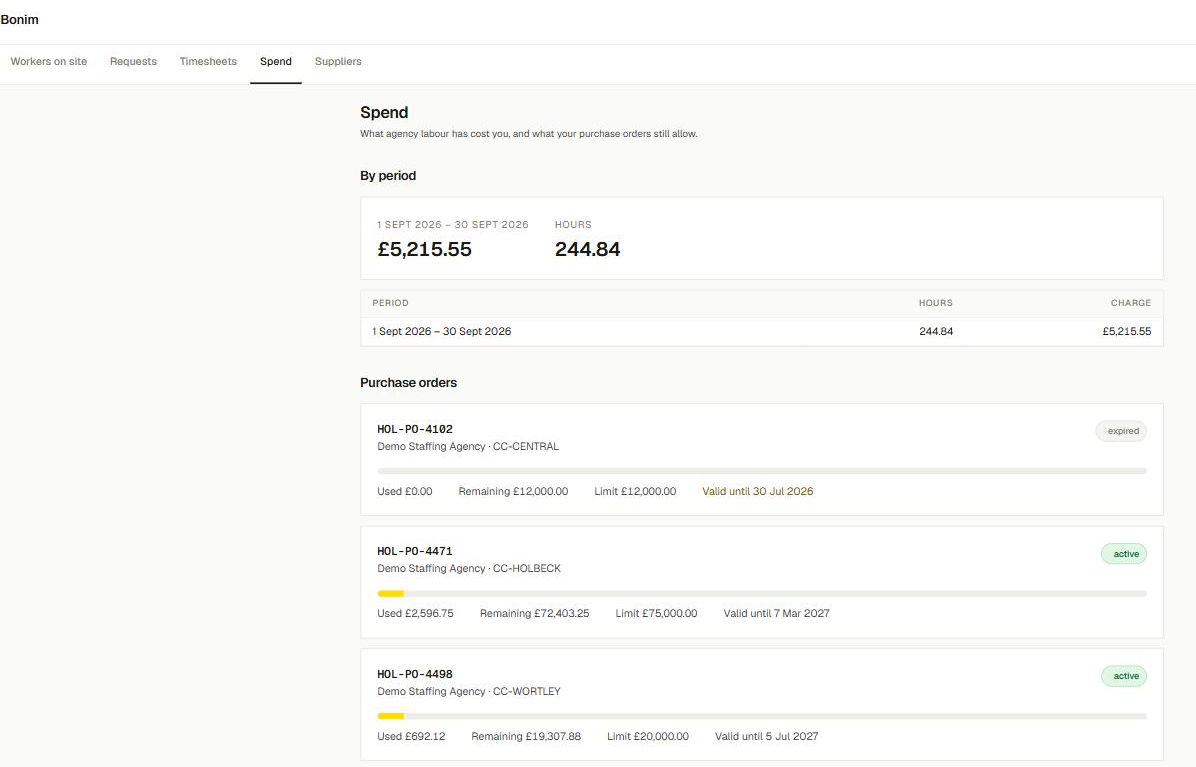
Your POs, going down as the work gets approved.
Each PO has a limit and a cost centre. As you approve work it comes off the PO, so you can see where you stand today rather than waiting for month-end. If a booking would take it past the limit, it will not go through. And if a PO has run out of date, you see that before anything is billed against it.
 Open the full-size screen
On every PO
Used, remaining and limit, with the bar to match
Against a cost centre
CC-HOLBECK, CC-WORTLEY, CC-CENTRAL
Caught early
An expired PO shows before it is billed against
02Approvals
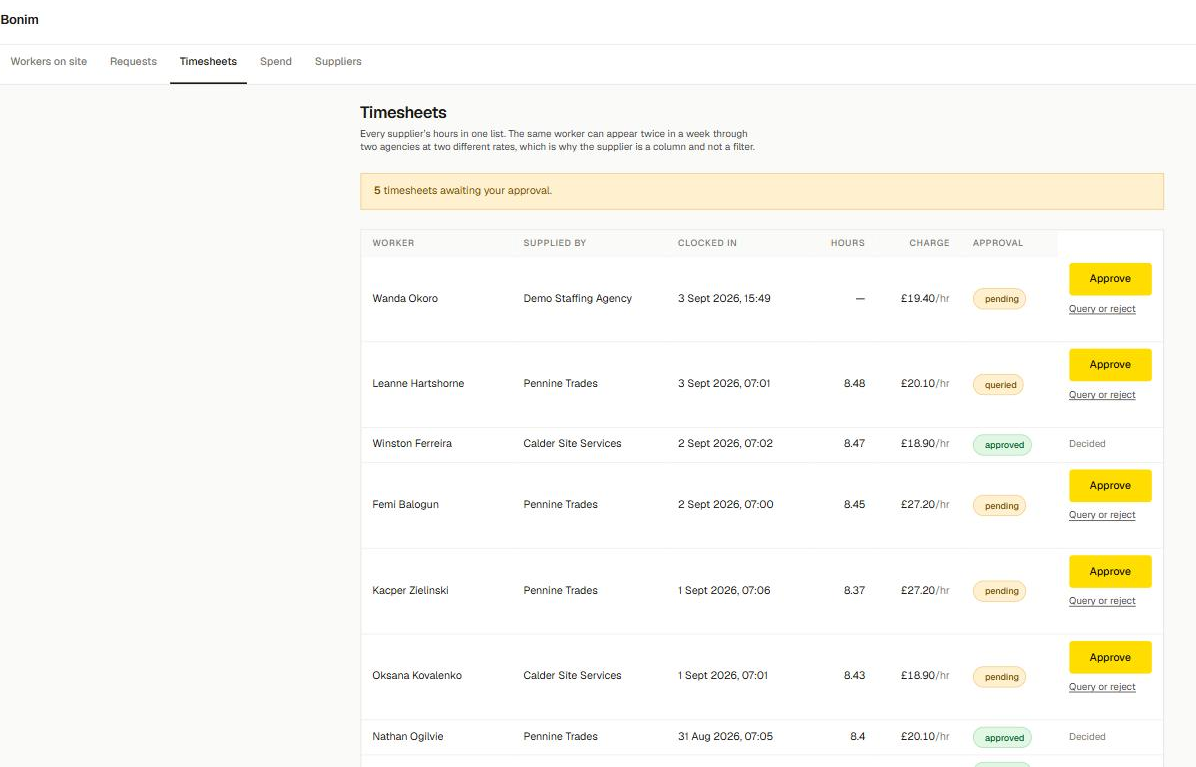
Every agency’s hours in one place to sign off.
All your suppliers’ hours in one list, with the rate on every line, so you know what you are approving before you approve it. Query or reject the ones that look wrong without leaving the page. The same person can turn up twice in a week through two agencies on two different rates, so we put the agency in its own column instead of making you switch between them.
 Open the full-size screen
Before you approve
The rate is on every line
Where each one stands
Approved, queried or still pending
Odd ones show up
A clock-in with no hours yet is easy to spot and query
03Fulfilment & rates
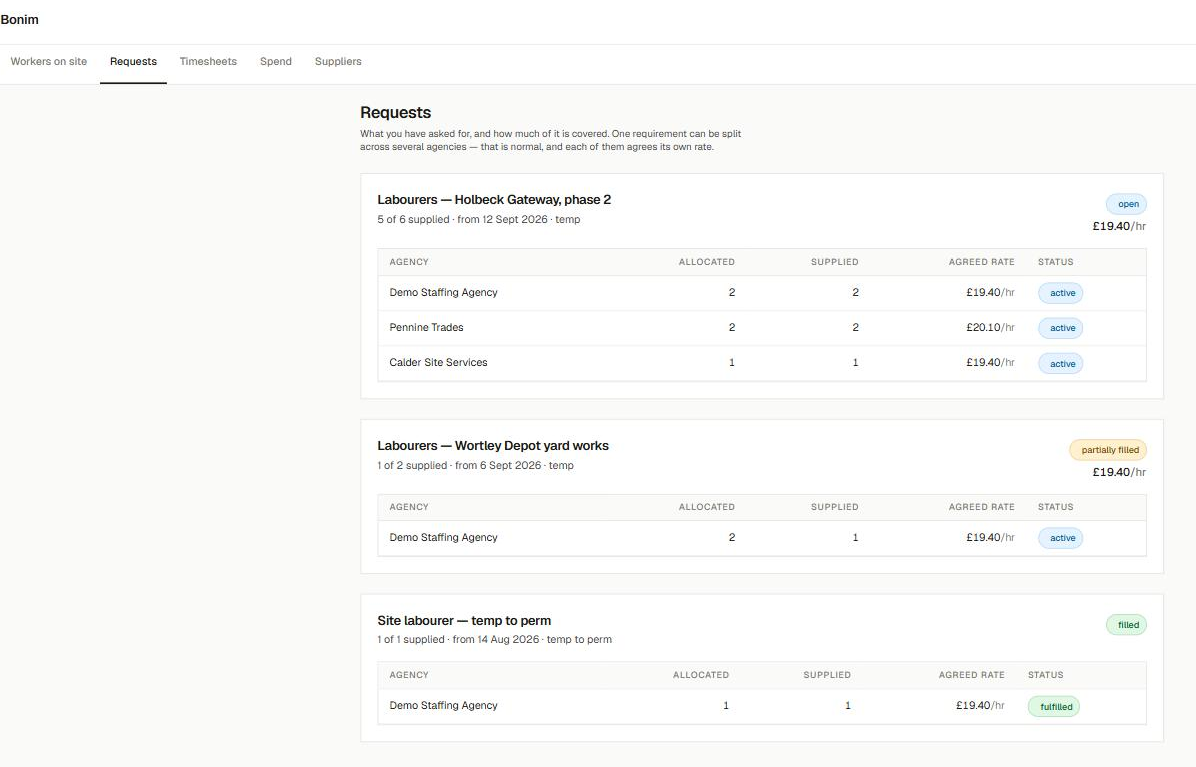
What you asked for, and what each agency charges for it.
Splitting one order across a few agencies is normal, and each one settles its own rate. On the same job you might pay £19.40 to one and £20.10 to another, and you can see both. When it says 5 of 6 supplied, you know you are one short in time to do something about it.
 Open the full-size screen
Line by line
What each agency was given, and what it filled
The rates, side by side
Each agency’s agreed rate on the job
Short, but early
Open, partially filled or filled
04Who you’re paying
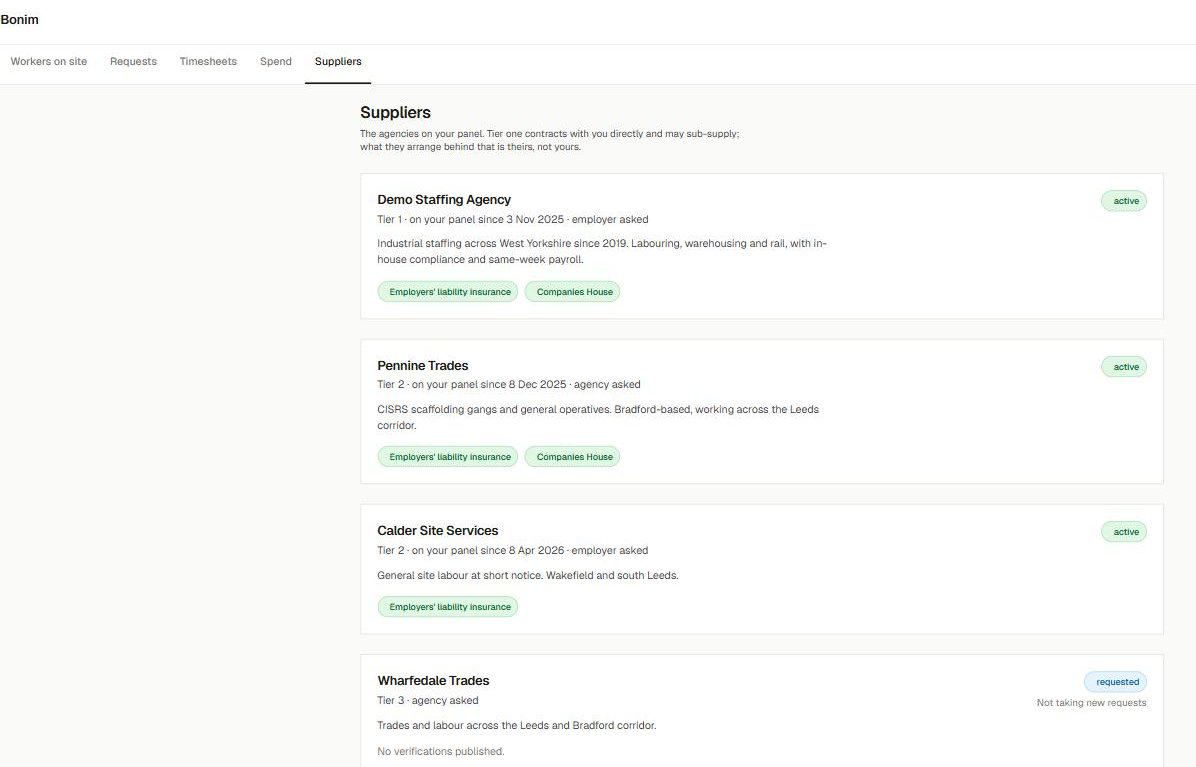
Know who you’re paying before the invoice turns up.
Every agency on your panel, with its tier and its checks kept up to date rather than sitting in a folder from the day you took them on. Employers’ liability, Companies House, and the rest. If a tier-three agency has published nothing, it says so, so you are not assuming cover that is not there.
 Open the full-size screen
The panel, laid out
Tier one, two and three, on your account
Kept current
Insurance and Companies House checked
Gaps show
“No verifications published” when there is nothing there
The quickest way to judge it
Try it on a week of your own hours.
Give us one real week of timesheets from the agencies you already use, and we will run it through so you can see it next to what it takes you now. It is free if you are the hirer. The agencies pay for it, and we do not take a cut of your spend.
[email protected] · mention “QS demo, construction”
Put together for quantity surveyors and commercial teams in construction. The screens come from a demo account, and the workers, rates, PO values and agency names in them are made up.